
ADB & Scrcpy Usage Guide
This is a detailed guide about using Android Debug Bridge (ADB) and Scrcpy tools, covering common issues and solutions.
Resource Links
- Scrcpy GitHub Homepage
- Scrcpy Connection Documentation
- Scrcpy v3.3.4 Release Page
- Android ADB Official Documentation
Scrcpy WiFi Connection Methods
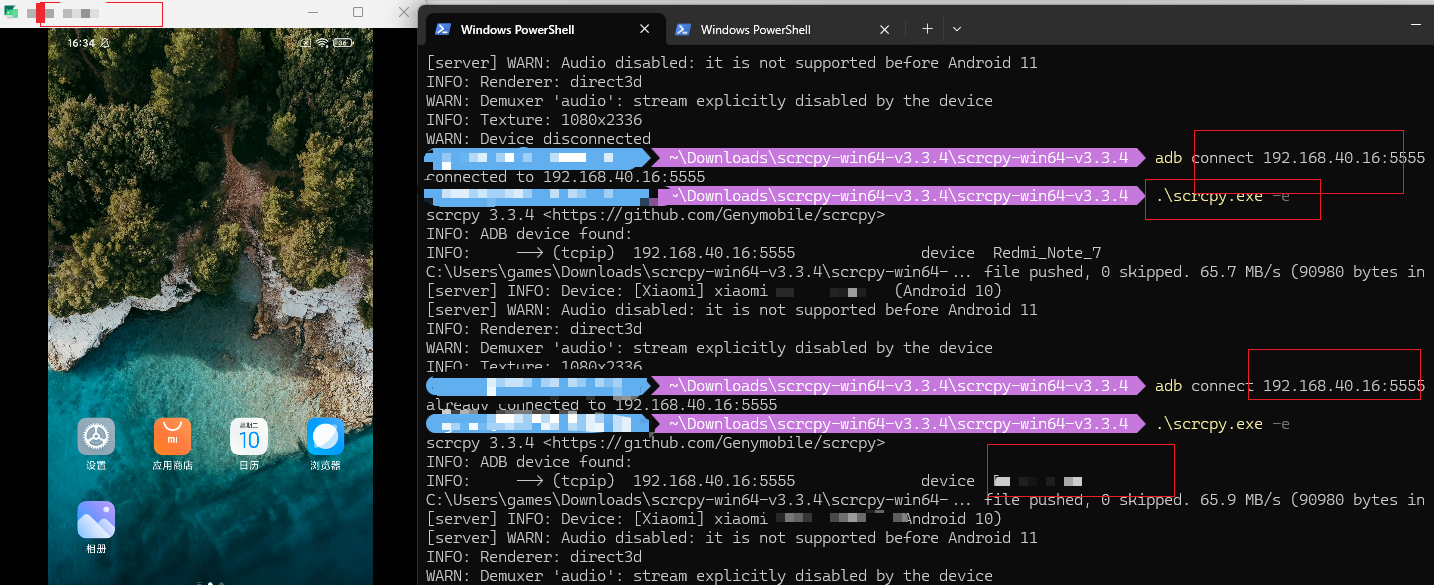
Method 1: USB First Pairing Then Switch to WiFi (Recommended)
Step 1: Initial USB Connection Activation
bash
# 1. Connect phone via USB cable first, confirm ADB can recognize
adb devices

# 2. Make device listen for TCP/IP connections (default port 5555)
adb tcpip 5555
Step 2: Disconnect USB, Switch to WiFi
bash
# 3. Check phone WiFi IP address (Settings → About Phone → Status Information)

# 4. Wireless connection (replace your_ip with actual IP)
adb connect your_ip:5555

# 5. Start Scrcpy
scrcpy
Common Command Parameters
| Operation | Command |
|---|---|
| View device IP | adb shell ip route or ifconfig wlan0 |
| Launch with specific device | scrcpy -s your_ip:5555 |
| Reduce quality for speed | scrcpy -m 1024 -b 2M |
| Screen only, no control | scrcpy -n |
| Fullscreen mode | scrcpy -f |
Multi-device Connection Issue Resolution
When both USB and WiFi are connected simultaneously, Scrcpy will show the following error:
ERROR: Multiple (2) ADB devices:
ERROR: --> (usb) askdlskdf device Redmi_Note_x
ERROR: --> (tcpip) 192.168.40.16:5555 device Redmi_Note_x
Solutions
Solution 1: Disconnect USB, Use WiFi Only (Recommended)
Unplug the USB cable directly, then run again:
bash
.\scrcpy.exeSolution 2: Specify WiFi Connection
bash
.\scrcpy.exe -eor
bash
.\scrcpy.exe --select-tcpipSolution 3: Specify USB Connection
bash
.\scrcpy.exe -dor
bash
.\scrcpy.exe --select-usbSolution 4: Specify Specific IP Address
bash
.\scrcpy.exe -s 192.168.40.16:5555Parameter Reference Table
| Parameter | Meaning | Usage Scenario |
|---|---|---|
-d | Select USB device | Want to use wired when cable is plugged |
-e | Select TCP/IP device | Want to use WiFi wireless |
-s <serial number> | Specify specific device | Precise control of multiple devices |
Common ADB Commands
| Command | Purpose |
|---|---|
adb devices | View connected devices |
adb connect IP:port | Wireless device connection |
adb disconnect | Disconnect wireless connection |
adb shell | Enter phone command line |
adb install xxx.apk | Install application |
adb push computer_file phone_path | Transfer files to phone |
adb pull phone_file computer_path | Pull files from phone |
Specifying Operation Target with Multiple Devices
When multiple devices exist, you can use the -s parameter to specify a particular device:
| Command | Purpose |
|---|---|
adb -s 192.168.40.16:5555 shell | Enter shell of specified device |
adb -s 192.168.40.16:5555 install app.apk | Install app to specified device |
adb -s 192.168.40.16:5555 push file.txt /sdcard/ | Transfer file to specified device |
ADB Shell Usage
Common operations after successfully entering ADB Shell:
View Accessible Directories
bash
# Enter storage directory (with permissions)
cd /sdcard
ls

# Or
cd /storage/emulated/0
ls
View System Information
bash
# Check Android version
getprop ro.build.version.release

# Check device model
getprop ro.product.model
File Operations (with permissions under /sdcard)
bash
cd /sdcard

# View files
ls -la

# Create folder
mkdir test_folder

# View current path
pwd
Exit ADB Shell
bash
exit
# Or press Ctrl+D
ADB Shell Practical Uses
- View logs:
logcat - Install app:
pm install xxx.apk - Screenshot:
screencap /sdcard/screen.png - Screen recording:
screenrecord /sdcard/video.mp4 - Reboot phone:
reboot
Version Information
Current ADB version:
Android Debug Bridge version 1.0.41
Version 36.0.0-13206524
Notes
- If the phone is not rooted, the
sucommand will showPermission denied - Android 10 and below do not support audio transmission
- It's recommended to unplug the USB cable after configuring WiFi connection to avoid multi-device conflicts
- Ensure firewall is not blocking corresponding ports for Scrcpy
Logs
ps1
adb devices -l
List of devices attached
192.168.40.16:5555 device product:lavender model:Redmi_Note_x device:lavender transport_id:6
user@DESKTOP-EH2GAQ2 ~\Downloads\scrcpy-win64-v3.3.4\scrcpy-win64-v3.3.4 .\adb.exe --version
Android Debug Bridge version 1.0.41
Version 36.0.0-13206524
Installed as C:\Users\user\Downloads\scrcpy-win64-v3.3.4\scrcpy-win64-v3.3.4\adb.exe
Running on Windows 10.0.26200
user@DESKTOP-EH2GAQ2 ~\Downloads\scrcpy-win64-v3.3.4\scrcpy-win64-v3.3.4 adb.exe --version
Android Debug Bridge version 1.0.41
Version 36.0.0-13206524
Installed as C:\Users\user\AppData\Local\Android\Sdk\platform-tools\adb.exe
Running on Windows 10.0.26200
user@DESKTOP-EH2GAQ2 ~\Downloads\scrcpy-win64-v3.3.4\scrcpy-win64-v3.3.4 adb -s askdlskdf shell
adb.exe: device 'askdlskdf' not found
user@DESKTOP-EH2GAQ2 ~\Downloads\scrcpy-win64-v3.3.4\scrcpy-win64-v3.3.4 adb devices
List of devices attached
192.168.40.16:5555 device
user@DESKTOP-EH2GAQ2 ~\Downloads\scrcpy-win64-v3.3.4\scrcpy-win64-v3.3.4 adb -s 192.168.40.16:5555 shell
lavender:/ $ su
/system/bin/sh: su: inaccessible or not found
127|lavender:/ $ exit
user@DESKTOP-EH2GAQ2 ~\Downloads\scrcpy-win64-v3.3.4\scrcpy-win64-v3.3.4 adb pair 192.168.40.16:5555
Enter pairing code: 139422 # 自己的
error: protocol fault (couldn't read status message): No error
user@DESKTOP-EH2GAQ2 ~\Downloads\scrcpy-win64-v3.3.4\scrcpy-win64-v3.3.4 .\scrcpy.exe
scrcpy 3.3.4 <https://github.com/Genymobile/scrcpy >
ERROR: Multiple (2) ADB devices:
ERROR: --> (usb) askdlskdf device Redmi_Note_x
ERROR: --> (tcpip) 192.168.40.16:5555 device Redmi_Note_x
ERROR: Select a device via -s (--serial), -d (--select-usb) or -e (--select-tcpip)
ERROR: Server connection failed
user@DESKTOP-EH2GAQ2 ~\Downloads\scrcpy-win64-v3.3.4\scrcpy-win64-v3.3.4 adb connect 192.168.40.16:5555
connected to 192.168.40.16:5555
user@DESKTOP-EH2GAQ2 ~\Downloads\scrcpy-win64-v3.3.4\scrcpy-win64-v3.3.4 .\scrcpy.exe -e
scrcpy 3.3.4 <https://github.com/Genymobile/scrcpy>
INFO: ADB device found:
INFO: --> (tcpip) 192.168.40.16:5555 device Redmi_Note_x
C:\Users\user\Downloads\scrcpy-win64-v3.3.4\scrcpy-win64-... file pushed, 0 skipped. 65.7 MB/s (90980 bytes in 0.001s)
[server] INFO: Device: [Xiaomi] xiaomi Redmi Note X (Android 10)
[server] WARN: Audio disabled: it is not supported before Android 11
INFO: Renderer: direct3d
WARN: Demuxer 'audio': stream explicitly disabled by the device
adb shell
lavender:/sdcard $ cd com
com.android.bankabc/ com.sfpay.mobile/ com.weilai.ssby.banana/
com.jifen.ac/ com.tencent.mtt/ com.wifi.ac/
lavender:/sdcard $ ip route
192.168.40.0/24 dev wlan0 proto kernel scope link src 192.168.40.16
lavender:/sdcard $ ip route | awk '{print $9}'
192.168.40.16